 Retro
RetroExtended codes
RetroGenY's own cheat format. An ordinary code writes one value to one address. An extended code is a short program: it can follow pointers, loop, check conditions and do the arithmetic a game uses to hide its numbers.
Why ordinary codes fall short
GameShark, Action Replay and CodeBreaker were designed for cartridges in the early 2000s. They are good at "always write 99 here", and that's about it. Many games don't keep their data in one place:
- Data that moves. Pokémon and many RPGs keep the bag, the party and the money behind a pointer, and the address changes with every save or even every time you open a menu. A fixed-address code works today and silently stops working tomorrow.
- Encrypted values. FireRed and LeafGreen store your money XOR'd with a key that differs per save. Writing 999999 directly gives you a random number; you have to read the key first.
- Whole lists. Setting every item in a 42-slot bag to 99 takes 42 separate codes, and they break the moment you pick something up.
- Conditions. "Only when I hold L+R", "only on empty slots", "only during battle" are mostly out of reach.
Extended codes were made for exactly these cases.
What they can do
- Follow pointers the same way the game does, so a code keeps working in any save.
- Loop over a bag, a party or a PC box, with
repeat 42 … end. - Check conditions: compare memory, test bits, skip empty slots, and add an
else. - React to buttons: run only while a button combination is held, for "press L+R to heal".
- Calculate with eight registers: add, subtract, multiply, AND, OR, XOR and shifts, enough to encode a value the way the game expects.
- Copy one value or a whole run of slots from somewhere else.
- Patch the game with
romlines, for changes that values alone can't make (a shop that charges 1, walking through walls). - Offer choices. An
optionline turns a value into a drop-down in the cheat list, so players pick "×2 / ×5 / ×10" without touching the code.
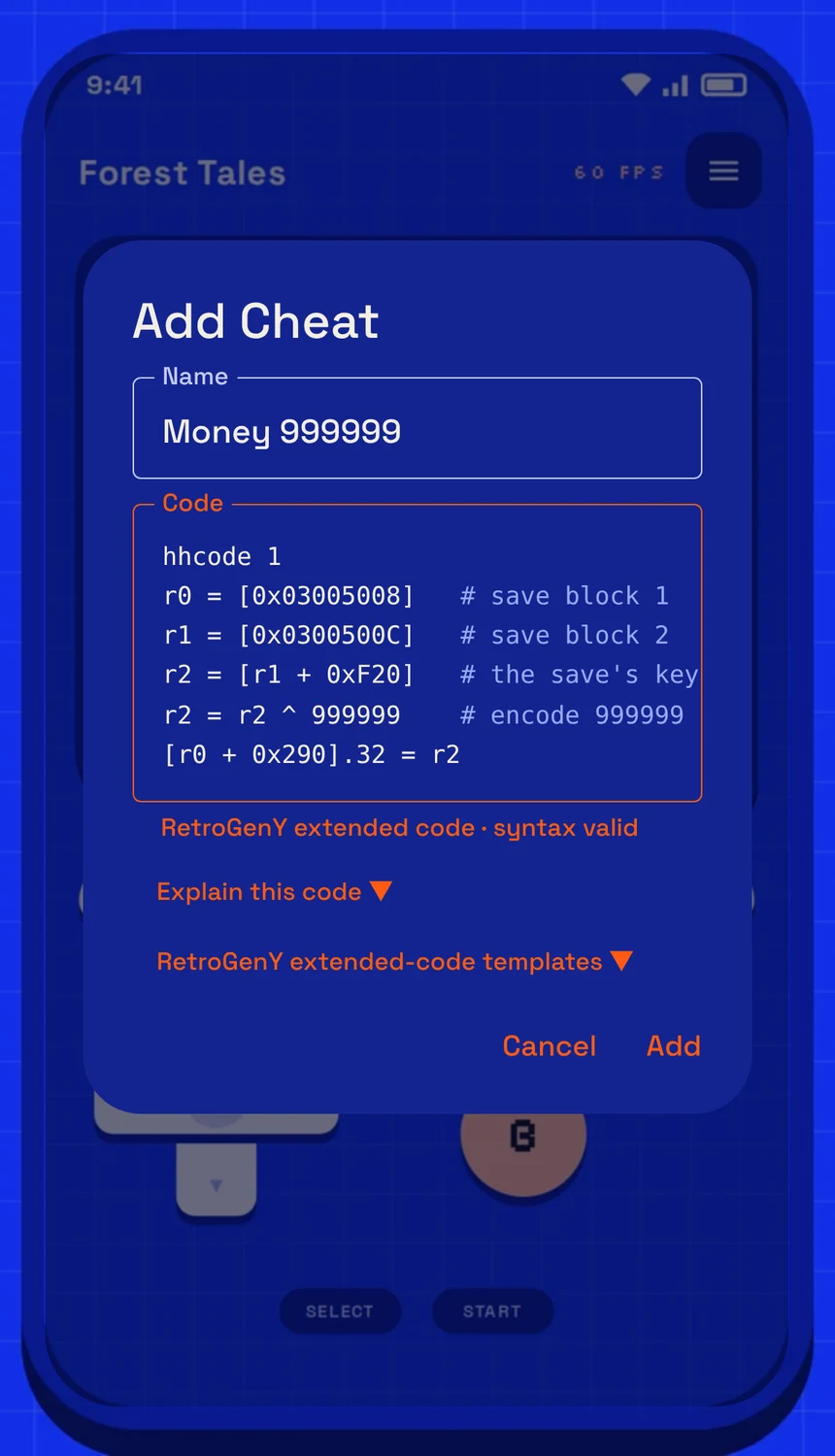
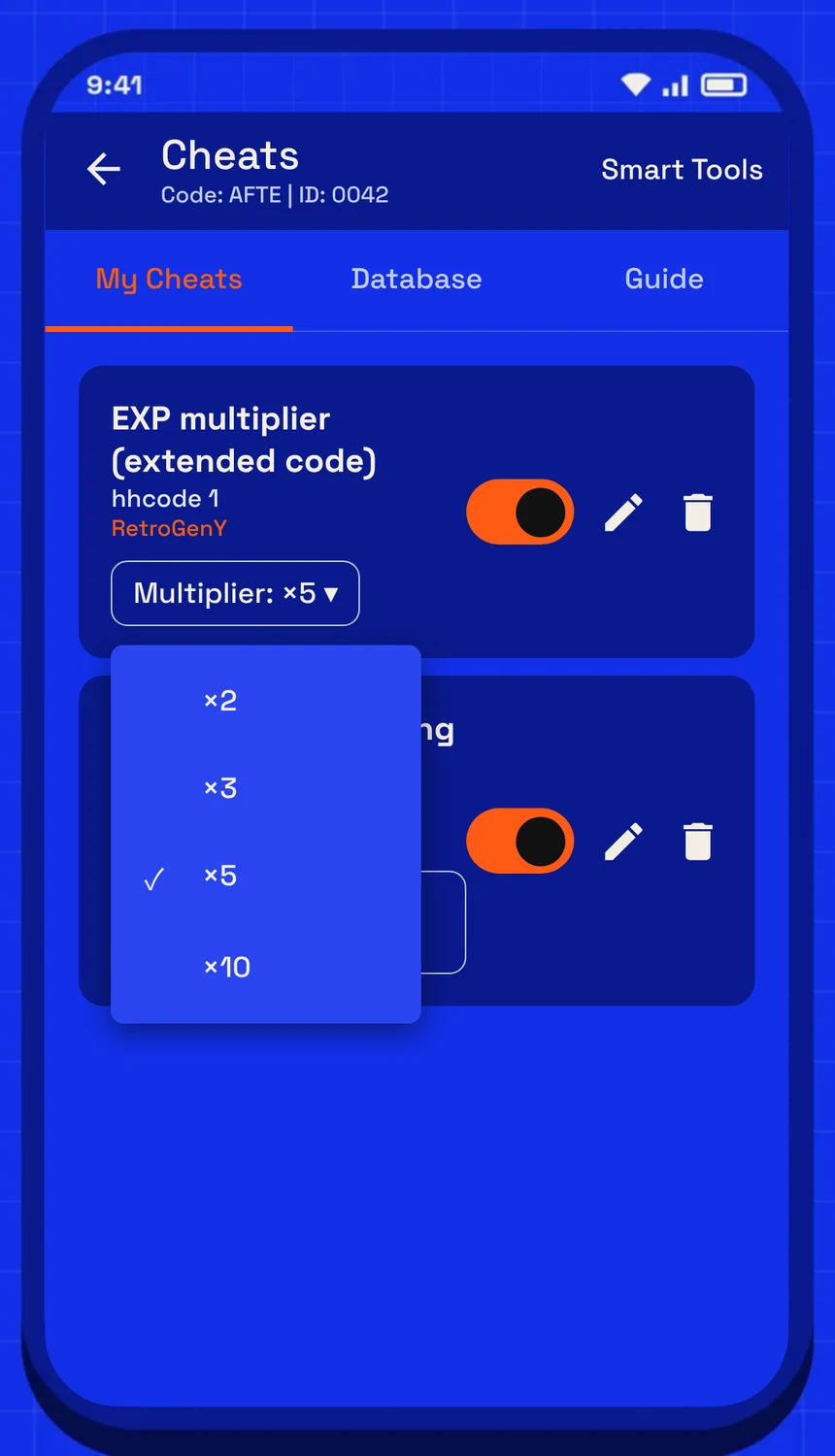
Left: the editor checks the code as you type. Right: codes with options get a drop-down right in the list.
A real example
Money 999999 in FireRed (English v1.0). The money sits behind a pointer and is encrypted with the save's key, which no ordinary code can handle:
hhcode 1
r0 = [0x03005008]        # save block 1: money and items live here
r1 = [0x0300500C]        # save block 2: the key lives here
r2 = [r1 + 0xF20]        # read the key
r2 = r2 ^ 999999         # encode 999999 with it
[r0 + 0x290].32 = r2     # write the money
Every item in the bag to 99, skipping empty slots:
hhcode 1
r0 = [0x03005008]
r1 = [0x0300500C]
r2 = [r1 + 0xF20]
r2 = r2 ^ 99             # counts are encrypted too
r0 = r0 + 0x310          # the bag: 42 slots
repeat 42
  if [r0].16 != 0        # skip empty slots
    [r0 + 2].16 = r2
  end
  r0 = r0 + 4            # next slot
end
Hold L+R to refill HP (address for illustration):
hhcode 1
if button L + R
  [0x02024330].16 = 999
end
A choice the player can change from the cheat list:
hhcode 1
option Multiplier = 2 { 2 ×2; 5 ×5; 10 ×10 }
[0x02001000].8 = $Multiplier
How to use them
- In a game, open the cheat panel and go to "My Cheats". Tap +.
- Give it a name, then type or paste the code. The first line must be
hhcode(orhhcode 1). - The editor checks every line as you type. A mistake is shown with its line number; a valid code says "syntax valid".
- Not sure what a code does, for example one somebody sent you? Tap "Explain this code" and it is read back to you in plain language.
- Don't want to start from scratch? Open "Extended-code templates": lock a value, pointer chain, consecutive slots, copy a value, walk a table, conditional write, else branch, button trigger, bit switch and more. Pick one and change the address and value.
- Tap Add and switch it on. Like every cheat, it runs every frame.
You often don't need to write one at all: Memory tools can find a value and write a pointer-based extended code for you.
Syntax at a glance
| Code | What it does |
|---|---|
[addr] = v | Write (32-bit by default) |
[addr].16 = v | Write with an explicit width: .8 / .16 / .32 |
[addr] = 40,42,0F | Write a run of bytes |
[addr].16 = 99 repeat 30 step 4 | Write 30 slots, 4 bytes apart |
[dst].16 = [src] | Copy a value |
[addr].16 += 5 | Read, change, write back: += -= &= |= |
r0 = [0x03005008] | Read memory into a register (start of a pointer chain) |
r0 = [r0 + 0x14] | Follow the pointer one more level |
[r0 + 4].8 = v | Write relative to a register |
r0 = r0 + 4 | Arithmetic: + - * & | ^ << >> and ~ |
repeat 30 … end | Loop a fixed number of times |
if [addr] == v … end | Condition: == != < > <= >=, unsigned <u >u, bit test & and !& |
if button L + R … end | Only while those buttons are held |
… else … end | Otherwise |
rom [addr].16 = v | Patch the game itself (reopen the game to undo) |
option name = v { v label; … } | A choice shown in the cheat list; use it as $name |
# text | Comment |
The full reference, with every rule, is in the app: cheat panel › "Guide" › RetroGenY extended codes.
Built to be safe
- It can't freeze the game. Each pass is capped at 200,000 instructions, so a loop written wrong just stops.
- Widths are forgiving. If a value doesn't fit the width you wrote, it is widened and you're told, instead of being cut off silently.
- It warns about likely mistakes, such as an address that looks like an offset from another format.
- Values are values. Decimal and hex mean the same thing, and you write the number, not its byte order.
The whole library speaks it
The built-in library's 9,000+ cheats for more than 1,700 games have been converted to extended codes, and each one was checked byte for byte against the original. Some games got hand-written extended codes that the old formats couldn't express, like encrypted money and full bags in FireRed. GameShark, Action Replay and CodeBreaker codes still work exactly as before.